The Best Free AI Tools Worth Using
Artificial intelligence tools are everywhere. New platforms appear almost every week, promising to help you write faster, create better designs, summarize information, organize your work, generate images, learn new skills, or complete tasks that once required hours of effort.
By Kate Willis on July 13, 2026
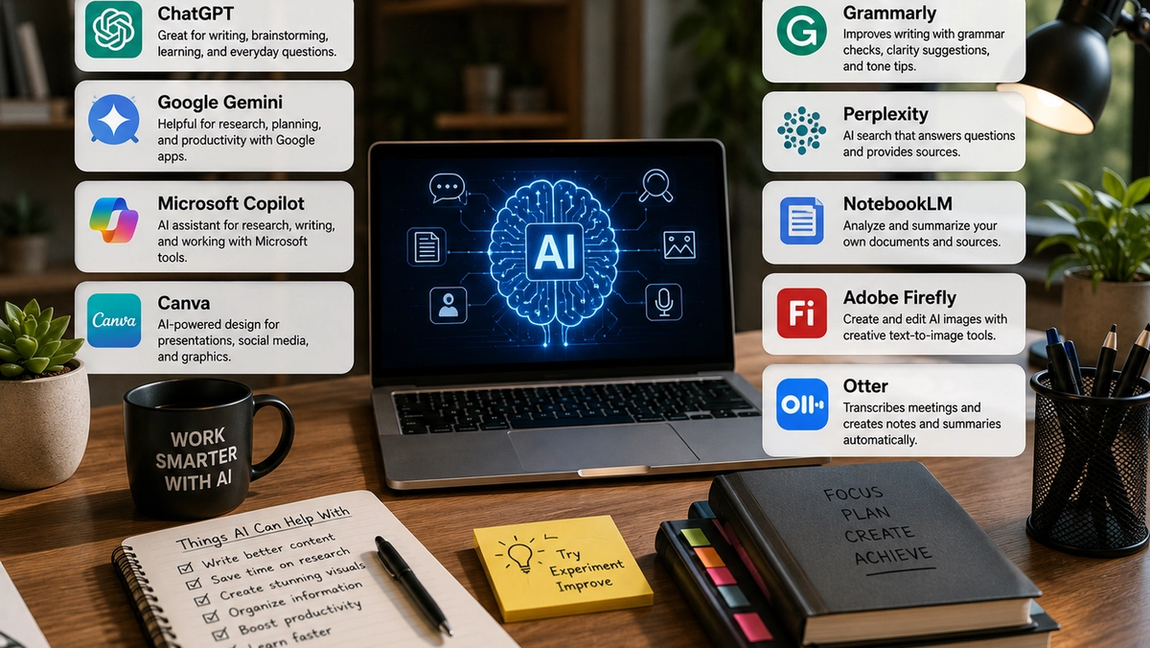
Artificial intelligence tools are everywhere.
New platforms appear almost every week, promising to help you write faster, create better designs, summarize information, organize your work, generate images, learn new skills, or complete tasks that once required hours of effort.
The challenge is no longer finding an AI tool. It is deciding which ones are genuinely useful.
Many platforms offer impressive features but require a paid subscription before you can do anything meaningful. Others solve problems that most people do not actually have. The best free AI tools are not necessarily the newest or most advanced. They are the ones that make everyday work easier without creating another complicated system to manage.
Free plans often include usage limits, fewer advanced features, or restricted access during busy periods. However, many still provide more than enough functionality for students, professionals, small business owners, creators, and anyone curious about using AI more effectively.
ChatGPT is useful for writing, ideas, and everyday questions
ChatGPT is one of the most versatile AI tools available because it can assist with many different types of work.
You can use it to create outlines, improve emails, explain unfamiliar concepts, brainstorm ideas, summarize information, prepare interview questions, organize rough notes, or generate a first draft when you are struggling with a blank page.
The quality of the response often depends on the quality of the instructions. A general request may produce a general answer, while additional context can make the result much more useful. Explaining the audience, purpose, preferred tone, and desired format helps the tool understand what you need.
ChatGPT is particularly valuable as a starting point. It can help you think more quickly and organize ideas, but important information should still be reviewed. AI can misunderstand context, provide outdated details, or present incorrect information confidently.
The strongest results usually come from treating it as an assistant rather than allowing it to make every decision for you.
Google Gemini works well with information and everyday productivity
Google Gemini is another general-purpose AI assistant that can help with writing, research, brainstorming, planning, and explaining complex topics.
It may be especially convenient for people who already use Google products as part of their daily work. Depending on the features available, Gemini can support tasks involving documents, emails, files, and other information within the Google ecosystem.
You might use it to summarize a long document, organize ideas for a presentation, compare different approaches to a project, or create a first draft of written content.
Like other AI assistants, Gemini works best when you provide clear instructions and review the output carefully. It can help reduce the time required to process information, but it should not automatically be treated as a reliable source for every fact.
Microsoft Copilot can simplify work and online research
Microsoft Copilot combines conversational AI with tools designed to support everyday productivity.
It can help answer questions, generate ideas, summarize topics, draft content, and explain information in simpler language. For people who regularly use Microsoft products, some versions of Copilot may also support tasks involving documents, spreadsheets, presentations, and workplace communication.
One useful way to use Copilot is as a starting point for research. Instead of opening many pages and trying to understand a topic from the beginning, you can ask for an overview and then explore the most relevant areas in greater detail.
However, summaries can leave out important context, and sources should always be checked before using information in professional, academic, financial, medical, or legal work.
AI can make research faster, but it does not remove the need to evaluate information critically.
Canva makes AI-powered design more accessible
Creating professional-looking visual content once required design experience or expensive software.
Canva has made the process much more accessible by combining templates with AI-assisted design features. Depending on the free features available, users may be able to generate design ideas, create images, edit photographs, prepare presentations, remove or change visual elements, and improve written content.
The platform is useful for social media posts, presentations, invitations, resumes, posters, simple marketing materials, and other everyday designs.
AI can speed up the creative process, but templates and generated designs may begin to look similar when many people use the same styles. Personalizing fonts, images, layouts, and wording can make the final result feel more original.
Canva is most useful when AI provides a starting point and human creativity shapes the finished design.
Grammarly helps improve everyday writing
Grammarly is designed to make writing clearer and easier to understand.
Its free tools can help identify spelling mistakes, grammatical errors, unclear sentences, and punctuation problems. Depending on the version and available features, it may also provide suggestions related to tone, clarity, and rewriting.
This can be useful for emails, reports, applications, articles, social media posts, and other professional communication.
However, not every suggestion needs to be accepted. Automated writing tools sometimes remove personality, change the intended meaning, or make informal writing sound unnecessarily formal.
Use Grammarly to identify possible improvements, but keep your own voice. Good writing is not only grammatically correct. It should also sound natural and appropriate for the person reading it.
Perplexity can make research more efficient
Perplexity is an AI-powered search and research tool designed to answer questions while providing links to supporting sources.
Instead of displaying only a list of search results, it organizes information into a direct response that can make unfamiliar topics easier to explore.
This can be useful when comparing products, researching a new industry, understanding current events, or finding an overview of a complicated subject.
The inclusion of sources makes it easier to investigate where information comes from, but citations should still be opened and reviewed. A source may not fully support the way a claim is presented, and important details can be misunderstood or removed from their original context.
Perplexity can make the early stages of research faster, but it should support careful research rather than replace it.
NotebookLM helps you work with your own sources
NotebookLM is particularly useful when you already have information and need help understanding or organizing it.
Users can add supported documents and source material, then ask questions based on that information. The tool can help summarize content, identify important themes, explain difficult sections, create study materials, or connect ideas across several sources.
This makes it useful for students reviewing course material, professionals working with reports, researchers analyzing documents, or anyone trying to understand a large amount of information.
Because the responses are grounded in the material you provide, NotebookLM may be more focused than asking a general AI assistant about the same topic.
However, important details should still be checked against the original documents. A summary is useful because it removes information, but that also means context can occasionally be lost.
Adobe Firefly can help create and edit images
Adobe Firefly provides AI tools for generating and editing visual content.
Users may be able to create images from written descriptions, explore different visual styles, generate design elements, or modify parts of an existing image. Free access generally includes a limited number of uses, but it can still be useful for experimenting with AI-generated visuals.
The tool may help create concept images, social media graphics, presentation visuals, mood boards, and creative inspiration.
Writing a detailed description usually improves the result. Information about the subject, setting, lighting, perspective, mood, and visual style gives the system more direction.
AI-generated images may still include inaccurate details or visual inconsistencies, so reviewing the final result carefully is important—especially when images are used commercially or presented as realistic events.
Otter can reduce the work that comes after meetings
Taking notes during a meeting can make it difficult to participate fully in the conversation.
Otter uses AI to transcribe spoken discussions and help organize meeting information. Depending on the free plan and available features, it may create transcripts, summaries, or useful notes that make follow-up easier.
Instead of relying entirely on memory, teams can review what was discussed and identify important decisions or next steps.
Transcription tools are not always accurate. Names, technical language, accents, and conversations with several speakers may create mistakes.
Privacy is also important. Participants should know when a meeting is being recorded or transcribed, and confidential information should only be used with tools approved by the relevant organization.
The best tool depends on the problem you need to solve
There is no single AI platform that is best for every task.
ChatGPT, Gemini, and Copilot are flexible assistants that can support many types of everyday work. Canva and Adobe Firefly are more focused on visual creation. Grammarly helps improve writing, while Perplexity supports research. NotebookLM is useful for working with your own sources, and Otter can simplify meeting notes.
You probably do not need all of them.
Using too many tools can create more complexity instead of saving time. Begin with one repetitive task that takes up more time than it should. Then test a tool designed to make that specific task easier.
The goal is not to use AI everywhere. It is to use it where it provides a clear benefit.
Free AI is useful when you use it thoughtfully
Free AI tools can help people write, learn, design, research, organize information, and complete routine work more efficiently.
However, free access often comes with limitations. Features, usage allowances, privacy policies, and pricing can change over time. Some platforms may also use submitted information to improve their systems, depending on their policies and account settings.
Avoid entering confidential business information, private customer data, passwords, financial details, or sensitive personal information into tools that have not been approved for that purpose.
AI output also requires review. Check important facts, correct mistakes, add original knowledge, and make sure the final result reflects your own goals and judgment.
The best free AI tools are not valuable simply because they use advanced technology.
They are valuable because they remove unnecessary work, make difficult tasks easier to begin, and give you more time for the parts that still benefit most from human creativity, experience, and attention.